How to Collect More Reviews Without Chasing Customers
Automatically collect reviews after every appointment — and turn every review into a new community member
As a service-based business owner, you already know that positive reviews are the lifeblood of your business. Whether you run a busy fitness studio, a bustling salon, or a therapy practice, what your clients say about you matters enormously.
But manually chasing clients for feedback after a long day of work is time-consuming and easy to deprioritise. Most businesses simply don't do it consistently — and that means missed reviews and slower growth.
GetaBooking's Automated Reviews feature handles the entire process for you — so you can focus on delivering great service while the feedback takes care of itself.
Watch the 3-minute walkthrough below to see it in action, or read on for a full breakdown.
Watch a 3-minute overview of Automated Reviews & Community Growth
How it Works: From Booking to Feedback in Two Minutes
Most review platforms do one thing: they collect stars on a third-party site you don't control. GetaBooking does things differently. It bridges the gap between your calendar, your reviews, and your social media communities.
1. Set and Forget Setup
You don't need a degree in tech or an extra monthly software subscription to get started. Inside your dashboard, it takes one single toggle to turn the system on. It's built right into your bookable items, meaning you can be up and running in less than two minutes.
2. Respectful Review Requests
Nobody likes a cluttered inbox. The system automatically sends a review request a few hours after a class or appointment — but it only ever asks them once per service. No repeated requests, no annoyance.
Class-by-class config: Don't want reviews on every single service you offer? No problem. You can choose exactly which classes trigger a feedback request and which ones don't.
3. Community Growth: The Thank-You Screen
This is where businesses can turn customer engagement into community growth. Instead of hitting a dead-end page after leaving a review, your clients are shown your custom Community Links.
With one tap, they can jump straight into your business's WhatsApp group, Facebook page, or Instagram. It turns a simple review into a direct line of communication with your regulars — perfect for filling last-minute cancellations or announcing new schedules.
4. Consent-First Privacy
We believe in total transparency. Before a customer submits their feedback, they must actively check a box that says: <em>"I'm happy for this review to be shared publicly."</em>
If they don't check it, the review stays 100% private between you and them. The public never sees customer names or email addresses — protecting your clients' data while showcasing authentic customer feedback.
5. Built-In Moderation and Compliance
If a review is disputed, you can flag it within your dashboard. To maintain compliance with UK consumer law, GetaBooking automatically adjusts public review visibility so that displayed ratings remain accurate and transparent — your public page is never left showing a misleading score. The flagged review is retained privately so you can still learn from it.
The Payoff: More Trust, More Bookings, Better SEO
When you activate automated reviews, your public booking page displays real, consented star ratings and comments alongside your service names and prices — giving potential customers the social proof they need at the point of decision.
GetaBooking also automatically publishes structured review data to your business page daily. Structured review markup can help search engines better understand your content and may make your pages eligible for enhanced search features, such as star ratings in results — though this is determined by the search engine and cannot be guaranteed.
Frequently Asked Questions
How will I be notified when I receive a review?
As soon as a client submits their feedback, you will receive an email notification instantly. The email includes their star ratings for both the booking experience and the service itself, so you can see at a glance how you are doing without even logging in.
How do I automate client reviews for my small business?
With GetaBooking, you simply enable the Feedback & Community feature in your dashboard with a single toggle. The system automatically sends a review request a few hours after a class or appointment. You never have to chase a review manually again.
Will clients be pestered for reviews on every booking?
No. GetaBooking only ever asks a client once per service. If they've already reviewed a service, they won't receive another request — keeping your communications respectful and spam-free.
Can I choose which services collect reviews?
Yes. You can select exactly which services trigger a feedback request. If you don't want reviews on a particular class or appointment type, simply leave it unticked in your dashboard settings.
How does the community growth feature work?
After a client submits their review, they are shown your custom Community Links — your WhatsApp group, Facebook page, or Instagram. With one tap they join your community directly, turning every review into a potential new community member.
Is customer data protected when reviews are published?
Yes. Clients must actively consent before any review can be made public. Customer names and email addresses are never shown publicly. If a review is disputed, it can be flagged — GetaBooking's compliance engine then automatically adjusts public review visibility to ensure displayed ratings remain accurate and representative of all submitted feedback.
Ready to put your reviews on autopilot? Stop chasing feedback and start building a community.
FAQ: How GetaBooking Stays Compliant with UK Law
How does GetaBooking keep review collection compliant with UK consumer laws?
UK consumer protection rules prohibit misleading review practices, including presenting a distorted picture of customer feedback by selectively displaying reviews. GetaBooking's compliance engine is built around these principles to help protect your business from the risks associated with non-compliant review handling.
What happens if I flag a disputed review?
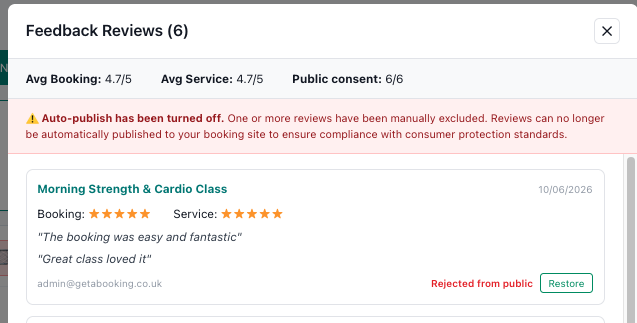
When you flag a disputed review, GetaBooking's compliance engine handles the legal requirements automatically. Rather than allowing a single hidden entry to create a misleading aggregate score — which would breach UK consumer law — the system disables the entire public review feed from your live booking site. Your account transitions into a private internal record so you can continue collecting and reviewing feedback without presenting a distorted picture to the public. One flag, and GetaBooking automatically adjusts public review visibility to support compliance with review transparency requirements.
Can I turn the public reviews back on later?
Yes. If you decide you want to display your public reviews and star counts again, simply unmark the hidden review. GetaBooking will instantly restore the complete, mathematically accurate live feed of all your client reviews to your public booking page, keeping you fully transparent and legal.
Ready to put your reviews on autopilot?
Stop chasing feedback and start building a community. Automated reviews are included for all GetaBooking customers at no extra cost.
👉 Start your free 14-day trial today